이미지 입력
Ailoy는 멀티모달 입력을 지원하여 단일 메시지에 텍스트와 이미지를 함께 포함할 수 있습니다. 이를 통해 시각적 질의응답, 이미지 캡셔닝, 근거 기반 추론 같은 더 풍부한 상호작용이 가능합니다.
정보
이미지 입력은 현재 시각적 콘텐츠를 기본적으로 이해하는 API 기반 모델에서만 지원됩니다.
다음 예제에서는 골든 리트리버 이미지를 사용합니다.
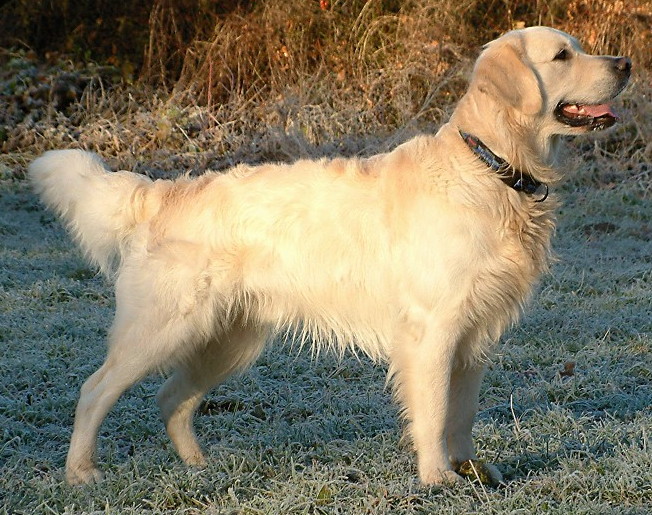
이미지 URL 제공하기
단일 메시지 내에서 여러 파트로 이미지 입력을 제공할 수 있습니다. 예를 들어,
Message 객체 내에서 image_from_url 메서드를 사용하여 URL을 통해 이미지를
첨부하고 텍스트 파트와 함께 사용할 수 있습니다.
- Python
- JavaScript
import asyncio

import ailoy as ai


async def main():
    message = ai.Message(
        role="user",
        contents=[
            ai.Part.image_from_url(
                "https://upload.wikimedia.org/wikipedia/commons/b/bd/Golden_Retriever_Dukedestiny01_drvd.jpg"
            ),
            ai.Part.Text("What do you see in this image?"),
        ],
    )
    lm = ai.LangModel.new_stream_api(
        spec="OpenAI",
        model_name="gpt-4o",
        api_key="<OPENAI_API_KEY>",
    )
    agent = ai.Agent(lm)
    async for resp in agent.run([message]):
        if isinstance(resp.message.contents[0], ai.Part.Text):
            print(resp.message.contents[0].text)


if __name__ == "__main__":
    asyncio.run(main())
import * as ai from "ailoy-node";

async function main() {
  const message = {
    role: "user",
    contents: [
      ai.imageFromUrl(
        "https://upload.wikimedia.org/wikipedia/commons/b/bd/Golden_Retriever_Dukedestiny01_drvd.jpg"
      ),
      { type: "text", text: "What do you see in this image?" },
    ],
  };
  const lm = await ai.LangModel.newStreamAPI(
    "OpenAI",
    "gpt-4o",
    "<OPENAI_API_KEY>"
  );
  const agent = new ai.Agent(lm);
  for await (const resp of agent.run([message])) {
    if (resp.message.contents[0].type === "text") {
      console.log(resp.message.contents[0].text);
    }
  }
}

main().catch((err) => {
  console.error("Error:", err);
});
출력은 다음과 같습니다
This image shows a Golden Retriever standing in an outdoor setting. The dog has a light, cream-colored coat and is wearing a collar. The background includes grass and some foliage.
정보
Gemini는 URL 이미지 입력을 지원하지 않습니다. 이미지 파일 제공하기에 설명된 대로 base64 이미지 입력을 대신 사용하세요.
이미지 파일 제공하기
로컬 파일에서 이미지를 읽어 직접 입력으로 포함할 수도 있습니다.
- Python
- JavaScript
import asyncio
from pathlib import Path

import ailoy as ai


async def main():
    data = Path("dog.jpg").read_bytes()

    message = ai.Message(
        role="user",
        contents=[
            ai.Part.image_from_bytes(data),
            ai.Part.Text("What do you see in this image?"),
        ],
    )
    lm = ai.LangModel.new_stream_api(
        spec="OpenAI",
        model_name="gpt-4o",
        api_key="<OPENAI_API_KEY>",
    )
    agent = ai.Agent(lm)
    async for resp in agent.run([message]):
        if isinstance(resp.message.contents[0], ai.Part.Text):
            print(resp.message.contents[0].text)


if __name__ == "__main__":
    asyncio.run(main())
import * as ai from "ailoy-node";
import * as fs from "fs";

async function main() {
  const data = fs.readFileSync("dog.jpg");

  const message = {
    role: "user",
    contents: [
      ai.imageFromData(data),
      { type: "text", text: "What do you see in this image?" },
    ],
  };
  const lm = await ai.LangModel.newStreamAPI(
    "OpenAI",
    "gpt-4o",
    "<OPENAI_API_KEY>"
  );
  const agent = new ai.Agent(lm);
  for await (const resp of agent.run([message])) {
    if (resp.message.contents[0].type === "text") {
      console.log(resp.message.contents[0].text);
    }
  }
}

main().catch((err) => {
  console.error("Error:", err);
});
동일한 출력이 생성됩니다.