Image Inputs
Ailoy supports multi-modal inputs, allowing you to include both text and images in a single message. This enables richer interactions such as visual question answering, image captioning, and grounded reasoning.
Image input is currently supported only for API-based models that natively understand visual content.
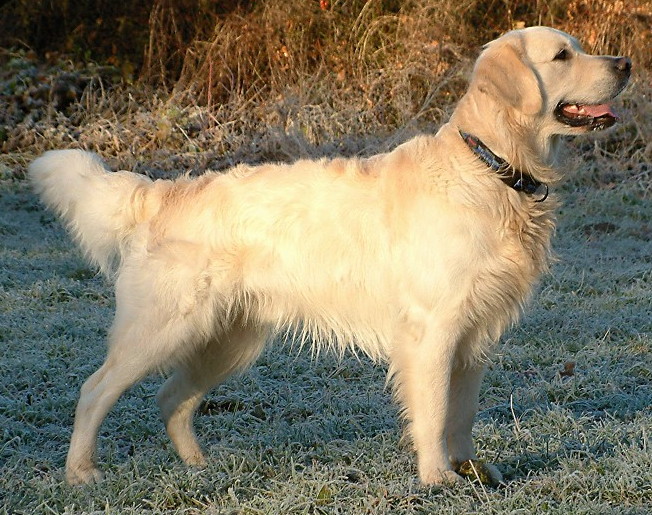
We will use an image of a golden retriever in the following examples.
Feeding an Image URL
You can provide image inputs as multiple parts within a single message. For
example, you can attach an image via URL using the image_from_url method
together with text parts inside a Message object.
- Python
- JavaScript
import asyncio

import ailoy as ai


async def main():
    message = ai.Message(
        role="user",
        contents=[
            ai.Part.image_from_url(
                "https://upload.wikimedia.org/wikipedia/commons/b/bd/Golden_Retriever_Dukedestiny01_drvd.jpg"
            ),
            ai.Part.Text("What do you see in this image?"),
        ],
    )
    lm = ai.LangModel.new_stream_api(
        spec="OpenAI",
        model_name="gpt-4o",
        api_key="<OPENAI_API_KEY>",
    )
    agent = ai.Agent(lm)
    async for resp in agent.run([message]):
        if isinstance(resp.message.contents[0], ai.Part.Text):
            print(resp.message.contents[0].text)


if __name__ == "__main__":
    asyncio.run(main())
import * as ai from "ailoy-node";

async function main() {
  const message = {
    role: "user",
    contents: [
      ai.imageFromUrl(
        "https://upload.wikimedia.org/wikipedia/commons/b/bd/Golden_Retriever_Dukedestiny01_drvd.jpg"
      ),
      { type: "text", text: "What do you see in this image?" },
    ],
  };
  const lm = await ai.LangModel.newStreamAPI(
    "OpenAI",
    "gpt-4o",
    "<OPENAI_API_KEY>"
  );
  const agent = new ai.Agent(lm);
  for await (const resp of agent.run([message])) {
    if (resp.message.contents[0].type === "text") {
      console.log(resp.message.contents[0].text);
    }
  }
}

main().catch((err) => {
  console.error("Error:", err);
});
Then the output looks like
This image shows a Golden Retriever standing in an outdoor setting. The dog has a light, cream-colored coat and is wearing a collar. The background includes grass and some foliage.
Gemini does not support URL image inputs. Use base64 image input instead as described in Feeding an Image File.
Feeding an Image File
Also, you can read an image from a local file and include it directly as input.
- Python
- JavaScript
import asyncio
from pathlib import Path

import ailoy as ai


async def main():
    data = Path("dog.jpg").read_bytes()

    message = ai.Message(
        role="user",
        contents=[
            ai.Part.image_from_bytes(data),
            ai.Part.Text("What do you see in this image?"),
        ],
    )
    lm = ai.LangModel.new_stream_api(
        spec="OpenAI",
        model_name="gpt-4o",
        api_key="<OPENAI_API_KEY>",
    )
    agent = ai.Agent(lm)
    async for resp in agent.run([message]):
        if isinstance(resp.message.contents[0], ai.Part.Text):
            print(resp.message.contents[0].text)


if __name__ == "__main__":
    asyncio.run(main())
import * as ai from "ailoy-node";
import * as fs from "fs";

async function main() {
  const data = fs.readFileSync("dog.jpg");

  const message = {
    role: "user",
    contents: [
      ai.imageFromData(data),
      { type: "text", text: "What do you see in this image?" },
    ],
  };
  const lm = await ai.LangModel.newStreamAPI(
    "OpenAI",
    "gpt-4o",
    "<OPENAI_API_KEY>"
  );
  const agent = new ai.Agent(lm);
  for await (const resp of agent.run([message])) {
    if (resp.message.contents[0].type === "text") {
      console.log(resp.message.contents[0].text);
    }
  }
}

main().catch((err) => {
  console.error("Error:", err);
});
This will produce the same output.